Today I caught up on some work for a lawyer client who uses Macs. I probably visit the office 2 – 3 times a year for some software installs and updates. We have worked with this Mac using law firm for 20 years. They have moved from Mac Centris machines to PowerPC to Intel based Macintoshes. There last purchase was mid-2007 iMacs and recently a MacMini Server to replace an aged eMac as a file server.
Showing posts with label synchronization. Show all posts
Showing posts with label synchronization. Show all posts
Wednesday, October 10, 2012
Law Firm Macintosh Upgrades - using the Cloud!
Taking a little time off from North Mahaska Schools work, here is a blog entry about working through upgrades to a long time 20 year client and their Macintosh setup.
Today I caught up on some work for a lawyer client who uses Macs. I probably visit the office 2 – 3 times a year for some software installs and updates. We have worked with this Mac using law firm for 20 years. They have moved from Mac Centris machines to PowerPC to Intel based Macintoshes. There last purchase was mid-2007 iMacs and recently a MacMini Server to replace an aged eMac as a file server.
We have been slowly working towards operating system updates after we made sure that production software would work with the latest OS X releases. Since the law firm as 4 iMacs, of which one is not in use daily, it was targeted as our test machine. Production software is updated as time, money and reality forces the process. Several years ago we moved away from Word Perfect to MS Word, but now run an Open Office variant called NeoOffice. Parallels 5 runs virtual machines with Windows XP and Child Support software. There is a Mac-based billing program as well.
One of the clinkers that prevented us in upgrading earlier was the calendar software program used in the olden days of the 1990s called DayTimer. The software company was purchased and the Mac version dropped from development. There is always a risk in picking any software product. We moved to SOHO Calendar for a few years but found they too were challenging us with their lack of development in the switch from PowerPC to Intel. SOHO Calendar used the OpenBase database engine which proved flakey at times. What is an IT consultant to do, right?
Apple had introduced MobileMe and it’s move to iCloud was known to me, so we bit the bullet and started using iCal (now Calendar in Mountain Lion) and iCloud to synch across multiple iMacs, the Mac Mini server, and added an iPad in April 2012 and this week a Samsung Galaxy SIII smart phone. The only purchase need to the Samsung was SmoothSync for Calendar at $2.65 from the Android app store. Since the iMac are still running Snow Leopard which is really MobileMe aware and not super conducive to iCloud, we are now proceeding with test Mountain Lion on a single iMac. If all goes well, the remaining iMacs will get the upgrade in the future.
iCloud also provides some cloud file storage so that the law firm does not have to use jump drives for file moves. Soon URL synching across Safari will also be possible. We are already synching the contacts in the Address Book (Contact in Mountain Lion). The lawyer takes his iPad 3G to court and on the road to see updates to his calendar and check his email. His Samsung phone also provides alerts in email and calendar events.
Lastly, the iCloud browser interface allows any office employee to check on their own PC or Mac when at home or on the road. So far the use of iCloud has been smooth and productive for the law firm’s needs. We are considering integration of DropBox for some file sharing and work away from the office as well and across PC, Mac, Android, iPad, etc… thought in Mountain Lion, I suspect iCloud will find some uses too. DropBox is still a better solution for non Apple software like NeoOffice.
Some people complain about iCloud’s expense, but things are changing and work well for the current client’s needs. I always try to encourage clients to use solutions that while not free, work painlessly for their needs and allow from growth that is painless as well. So far, iCloud has been a sound investment in that regard.
Today I caught up on some work for a lawyer client who uses Macs. I probably visit the office 2 – 3 times a year for some software installs and updates. We have worked with this Mac using law firm for 20 years. They have moved from Mac Centris machines to PowerPC to Intel based Macintoshes. There last purchase was mid-2007 iMacs and recently a MacMini Server to replace an aged eMac as a file server.

Wednesday, September 19, 2012
Mobility Account Synching with Teachers
Currently the North Mahaska laptops issues to teachers and staff use Apple's mobility accounts. This has the benefit of keeping a copy of the files from the laptop on the local network server. To keep data synching to a reasonable level of activity, only documents and desktop files are synchronized and the ~/Library, ~/Movies, ~/Pictures, ~/Music are prevented from synching.
A couple typical issues have come up in the past year that prevent good solid synchronized files between the laptops and the server. Again, the primary culprit is human interaction and usage of the laptop in ways that while natural for them, cause issues on the technical level.
Issue 1 - I need to use my laptop now; I can't wait for synchronization of my files. By pausing or canceling the synchronization process, the local files on the laptop will not get pushed to the server. In affect, over time the number and size of the files for synching grows. And when a teacher or technology person needs to ensure a complete synchronization, then it takes a long time. In addition, if the server synch is a primary means of backup, the backup is NO good.
Issue 2 - I decided to save a new iPhoto library in my Documents folder and have been saving iDVD and video projects on my Desktop; its just easier that way! Apple's server technology is designed to exclude paths. When teachers make decisions on where they store large files like photos and movies, this makes synchronization more challenging. Combine Issue 1 with this issue and the synchronization issues really get messy.
Since the use of mobility accounts has generally worked well for the past 4 years, it seems natural to continue their use with Mountain Lion. However, we will continue to educate teachers on backups in hopes they buy the low cost USB external hard drives and use them for Time Machine backups. Now there may be those whom believe we could use our LAN and server hard drive space for Time Machine machines, but that space is limited right now. We are implementing Time Machine backups for network account users like secretaries and the nurse.
Good education and training for the teachers must be followed by teachers practicing what they learned to keep operations moving ahead smoothly. When teachers have solid reasoning for doing things contrary to their training from the school administration, they must communicate those ideas and practices so the technology can be adapted to work. After all, change is constant and we want to adapt to the needs of the classroom teacher in so far as it is possible and timely.
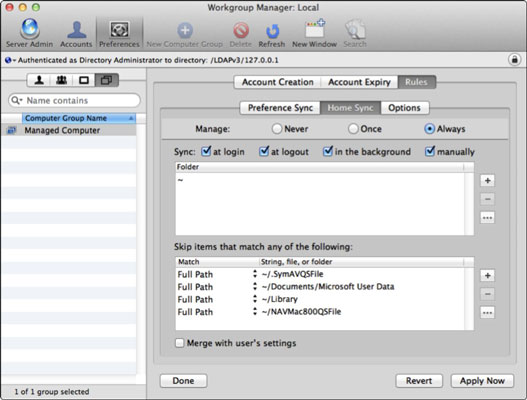 |
| Managing Home Synchronization folders and exceptions |
A couple typical issues have come up in the past year that prevent good solid synchronized files between the laptops and the server. Again, the primary culprit is human interaction and usage of the laptop in ways that while natural for them, cause issues on the technical level.
Issue 1 - I need to use my laptop now; I can't wait for synchronization of my files. By pausing or canceling the synchronization process, the local files on the laptop will not get pushed to the server. In affect, over time the number and size of the files for synching grows. And when a teacher or technology person needs to ensure a complete synchronization, then it takes a long time. In addition, if the server synch is a primary means of backup, the backup is NO good.
Issue 2 - I decided to save a new iPhoto library in my Documents folder and have been saving iDVD and video projects on my Desktop; its just easier that way! Apple's server technology is designed to exclude paths. When teachers make decisions on where they store large files like photos and movies, this makes synchronization more challenging. Combine Issue 1 with this issue and the synchronization issues really get messy.
Since the use of mobility accounts has generally worked well for the past 4 years, it seems natural to continue their use with Mountain Lion. However, we will continue to educate teachers on backups in hopes they buy the low cost USB external hard drives and use them for Time Machine backups. Now there may be those whom believe we could use our LAN and server hard drive space for Time Machine machines, but that space is limited right now. We are implementing Time Machine backups for network account users like secretaries and the nurse.
Good education and training for the teachers must be followed by teachers practicing what they learned to keep operations moving ahead smoothly. When teachers have solid reasoning for doing things contrary to their training from the school administration, they must communicate those ideas and practices so the technology can be adapted to work. After all, change is constant and we want to adapt to the needs of the classroom teacher in so far as it is possible and timely.
Subscribe to:
Posts (Atom)